ground truth · chrome extension + mcp server
Sounds right. Is it real?
An AI can quote a Quran verse mid-answer with total confidence whether or not the reference is real. Ground Truth checks it against the actual licensed text - free, two ways to run it. Install the browser extension for chat tabs, or the MCP server for your own agent. Same checking engine either way.
Why this exists, and the real bugs found building it against itself → read the full newsletter post.
step 1 of 3
Install the browser extension
Works today in Chrome, Edge, Brave - any Chromium browser. Live on the Chrome Web Store:
Prefer to run from source instead?
- Clone the repo:
git clone https://github.com/multimodeai/ground-truth.git - Open
chrome://extensions(oredge://extensions,brave://extensions) - Toggle Developer mode on, top right
- Click Load unpacked
- Select the repo’s
extension/folder
Also works without any of the seven supported sites: select any text on any page, right-click, choose “Check with Ground Truth” - or paste text directly into the toolbar popup.
step 2 of 3 · optional, or alongside step 1
Install the MCP server
Building with an agent instead of (or alongside) a browser? The MCP server exposes the exact same checking engine as a tool any MCP-compatible client can call on its own drafted answer, before a citation ever reaches you.
- Already on npm as
@hududed/ground-truth-mcp- no clone needed:npx -y @hududed/ground-truth-mcp
- Claude Code, one line:
claude mcp add ground-truth -- npx -y @hududed/ground-truth-mcp
- Claude Desktop - add this to your config (
~/Library/Application Support/Claude/claude_desktop_config.jsonon macOS):{ "mcpServers": { "ground-truth": { "command": "npx", "args": ["-y", "@hududed/ground-truth-mcp"] } } } - Restart Claude Desktop (or reload Claude Code) - it’s live.
Working from a local checkout instead of the published package? Point command at node /absolute/path/to/ground-truth/mcp-server/server.js. To verify it yourself against the real MCP transport: cd mcp-server && npm install && node test.js.
step 3 of 3
Try it
However you installed it, the test is the same: give an AI a reason to cite a verse, then watch what happens.
Installed the extension? Ask ChatGPT, Claude, Gemini, Grok, Google AI Mode, Perplexity, or Meta AI to quote a Quran verse. Within a second or two a small mark lands right next to the citation - green if it checks out, red if it doesn’t, amber if something more specific is going on (right verse, wrong number, that kind of thing). Click the mark for a word-level explanation.
Installed the MCP server? Ask your MCP-connected agent (Claude Desktop, Claude Code, Cursor) to quote a verse, then ask it to check its own citation with Ground Truth. It calls check_quran_citation (or check_hadith_citation for a hadith) and reports the verdict back to you - before a bad citation ever gets presented as settled.
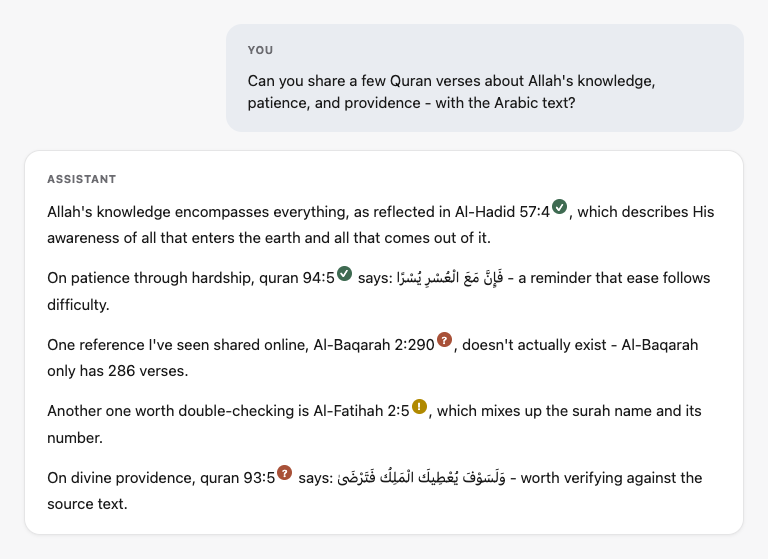
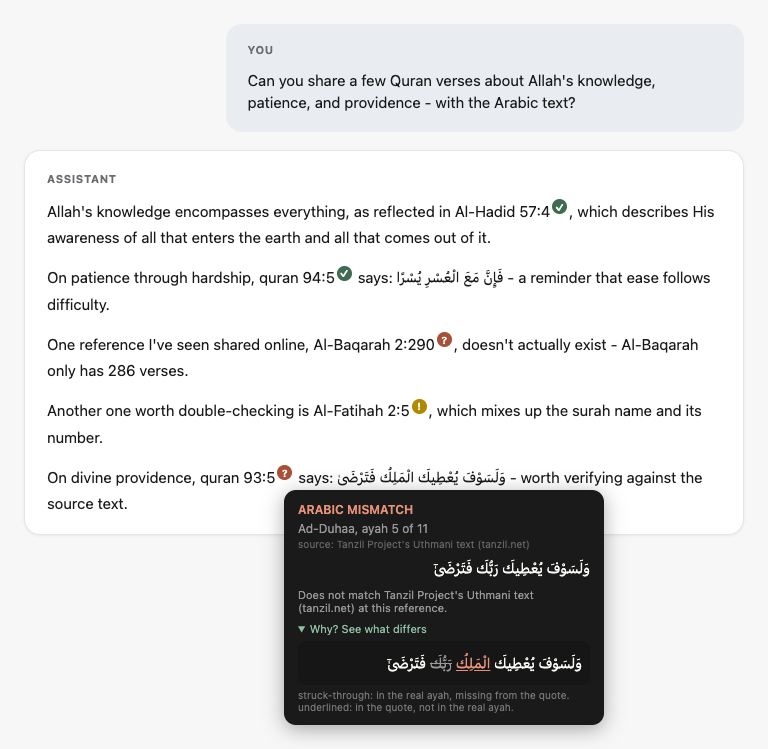
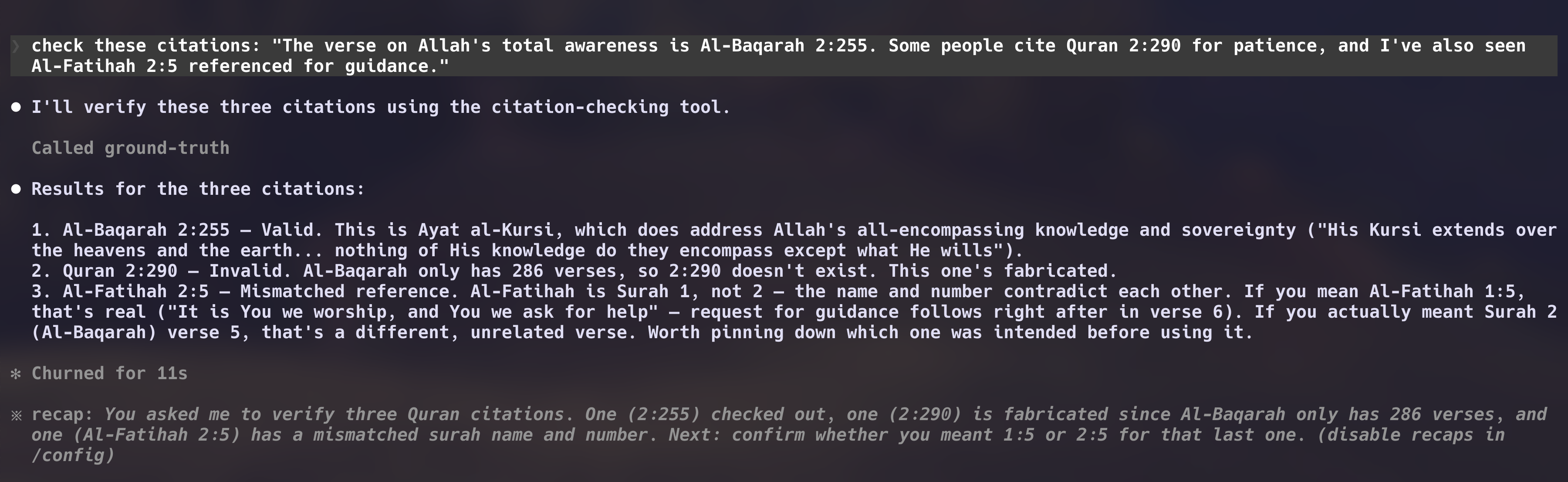
What green, red, and amber mean
- Reference validity - does the cited surah:ayah exist (“Quran 2:290” doesn’t - Al-Baqarah only runs to 286).
- Arabic exact-match - if Arabic is quoted, diffed against the licensed Tanzil Uthmani text.
- Name/number mismatch - a real ayah cited under a surah name that doesn’t match the stated number.
- Hadith wording (MCP server only, today) - if a hadith’s wording is quoted, checked live against HadeethEnc’s public Hadith Encyclopedia; confirming the exact collection+number is a stub until a licensed source is available.
- Does not grade hadith authenticity, rule on fiqh, interpret tafsir, or score an English paraphrase - none of those are shipped, on purpose.
Get it
Browser extension
Live on the Chrome Web Store. Loading unpacked from source (Step 1 above) still works too.